


71% of them upgrade within the first 30 days.
I track it, I’m not guessing.
And a big part of that number comes down to one email: the welcome email. Last month I got 17.9% of my new paid members upgrading from that very same email. Here’s the breakdown:
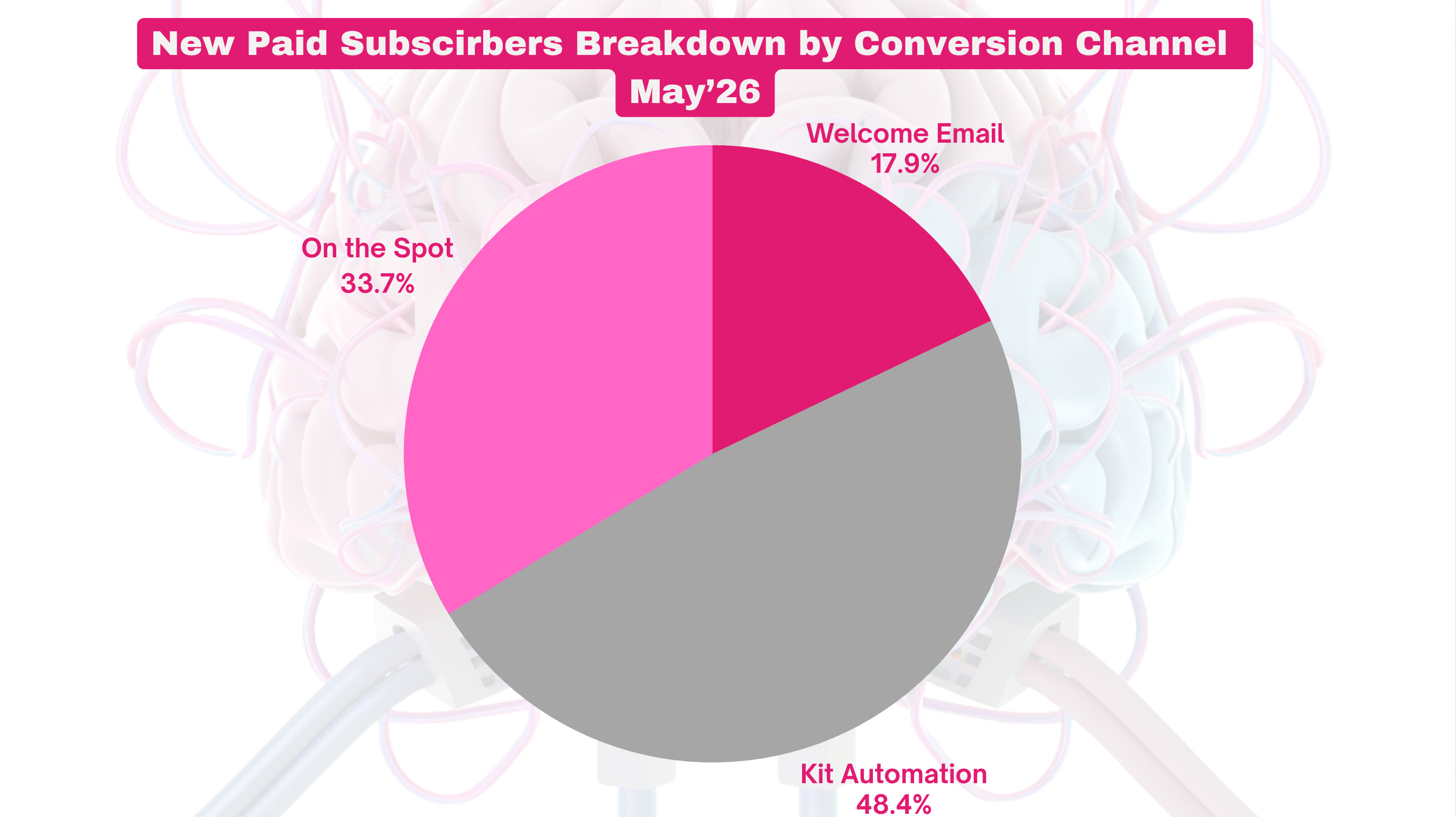
The one that goes out the second someone subscribes, exactly when their attention is at its peak.
Last time I gave you the full method how you can write your email by yourself - the PPSA formula, the 6-element structure, the 3 objections to handle before they show up. And the printable cheat sheet to keep by your screen. If you missed it, start there:

Here’s what happened after I published it.
People loved the breakdown, but some of them hit the wall - they understood the method, just stalled on actually writing the thing.
It’s one of the biggest pain points I help deal with in my coaching program.
The blank page is where good methods go to die
Knowing the structure and writing the email are two different jobs.
You sit down to rewrite your welcome email. You’ve got the checklist next to you. And then you stare at the screen, because now you have to find the exact words for your pain hook. Your proof. Your one CTA that doesn’t sound pushy.
And it’s not one email.
If you run a paid newsletter, you need a welcome email for free subscribers (the one that pitches the upgrade). A different one for people who already paid (you don’t sell them what they bought). A third for founding members, if you have that tier. And a fourth if you’re importing subscribers from Kit or Mailchimp.
That’s up to 4 emails, each with a different job.
Most people write one generic “thanks for subscribing” with a paragraph about what the newsletter is about and call it done.
Leaving money on the table.
Big time.
I see it almost every time I make a review for a VIP member.
So I built a Claude Skill that writes them
I took my entire welcome email formula and turned it into a Claude skill.
You install it once. You tell it about your newsletter. It interviews you in three short rounds, then writes every welcome email your setup needs, each one ready to paste straight into Substack.
It works like having me interview you. It asks the right questions first, then writes in your voice, for your offer, handling your readers’ actual objections.
Here’s the proof it’s built on. My welcome email is one of the reasons my conversion rate from Substack organic channels hit 11.3% when the industry average is 3 to 5%.
Here’s exactly how it works.
Step 0: What the skill actually is
It’s a Claude skill. A file you install once into Claude, and from then on Claude knows how to write welcome emails the way I do.
If you’ve used my Viral Notes Writer or my Sales Sequence Generator, it’s the same idea. You drop in the skill, and Claude follows my framework instead of guessing.
Like always, it refuses to write a single word until it understands your newsletter.
Because a generic welcome email converts at 1 to 2%, and a specific one converts at 10%+. The specificity is the whole game.
So before it writes, it asks.
Feed it with as much context as you can.
Step 1: It interviews you in three rounds
This is the part that makes the emails actually convert. The skill runs a discovery interview, split into three short rounds so you can think clearly instead of facing one giant wall of questions.
You can skip this if Claude already knows you inside out. If not, please answer with as much detail as you can, and do not use AI for those answers if you want to have quality output.
Round 1 is your setup. Free newsletter, paid, or paid with a founding tier. Whether you’re importing subscribers. Your newsletter name, your name, your URL. This tells the skill which emails to write.
Round 2 is your positioning. Who your newsletter is for and the exact pain it solves. The one transformation a reader. The common advice in your niche you disagree with (your contrarian angle). Your own vulnerability moment with the problem. And your strongest proof points.
This is where the magic lives - your answers here become the Pain and the Proof in every email.
Round 3 is your offers. Your lead magnet and how people get it (if you have one). What you publish and when. Your paid tier benefits and price. Your founding tier, if you have one. And the reply question you want subscribers to answer at the end.
Then it reads your answers back to you in two or three sentences, flags anything vague, and lets you correct it before it writes.
Reminder: if your answer on the lead magnet is fuzzy (”I have a welcome PDF”), it’ll push you for specifics. A vague lead magnet produces a vague email. The skill won’t let you skip that.
Step 2: It writes a draft of every welcome email your setup needs
Once it has your answers, it writes. And it writes the right set for your newsletter type.
Run a free newsletter? You get a free-subscriber welcome built around your main offer, plus an imported-subscriber welcome if you’re migrating.
Run a paid newsletter? You get the free-subscriber welcome (pitching the upgrade), the paid-subscriber welcome (orienting them, never re-selling what they bought), and the founding welcome if you have that tier.
Each email runs on my PPSA formula and the 6-element structure I use to convert.
And every email comes out in a clean, paste-ready format, adapted for each type of subscriber: three subject line options, and the full body.
You only need some final edits.
That’s it.
Step 3: The cleaning layer (so it sounds like you, not a robot or a sleazy salesman from the 80s)
This is the part I won’t ship a writing skill without.
I baked into the skill a strict list of AI fluff banned from using. The dead vocabulary (delve, unlock, leverage, seamless, all of it). The fake-depth reframes (”it’s not about X, it’s about Y”). The corporate transitions. The hype words.
It also makes sure it uses my sell without selling framework, so you never say “buy my thing”, or use fake deadlines.
It writes short sentences, then a longer one carrying a real detail, then short again. It varies the rhythm, because a steady stream of medium-length sentences is the clearest sign a machine wrote something.
It also matches the voice you describe in Round 2. Tell it you write warm and direct, and it won’t hand you cold corporate language.
The result is an email you’d actually send. Which is the only kind that converts.
How to get it and install it
The Welcome Email Writer skill is part of the Unplugged toolbox (coming soon), where I’m collecting all my Claude skills in one place for VIP members, but this one I give to all paid members. Download it here:
Or get this skill from the HUB here:
Installing it takes about a minute, you’ll find the instruction inside.
Common questions about the Welcome Email Writer
What is the Welcome Email Writer skill? It’s a Claude skill built on my PPSA welcome email formula (Pain, Proof, Solution, Action). You install it once into Claude, answer a short interview about your newsletter, and it writes every welcome email your setup needs, each one ready to paste into Substack.
How is it different from using ChatGPT or Claude? It interviews you in three rounds before it writes a single word, so the emails are built on your positioning, your proof, and your actual offer. A generic welcome email converts at 1 to 2%. A specific one converts at 5%+. The interview is what makes them specific and my formula is what makes them convert.
Will the emails sound like AI wrote them? No. The skill has a strict anti-AI layer baked in. It bans the dead vocabulary, the fake-depth reframes, and the corporate filler that give AI writing away, and it matches the voice you describe in the interview.
What if I only have a free newsletter with no paid tier? It still works. For free newsletters it writes a welcome email built around your main offer (a course, coaching, a product, an affiliate), plus an imported-subscriber welcome if you’re migrating from another platform.
Can I use it with a newsletter outside Substack? Yes, just tell Claude more details bout your newsletter, it will adapt.
How many emails does it write? Up to four, depending on your setup: free subscriber, paid subscriber, founding member, and imported subscriber.
How long does it take? One conversation. You answer the three rounds of questions, and by the end you have your welcome emails written, with three subject line options and preview text for each.
Do paid members get it for free? Yes. It’s a paid member benefit going into the Unplugged toolbox. If you want it before the toolbox launches, it’s on Gumroad now.
Bottom line
Your welcome email goes to the most motivated reader you will ever have. Someone who just decided they want more of you.
Last time I gave you the formula to write it by hand. Now I’m giving you the skill that writes it for you, in every version your setup needs, in your voice, built to convert from the first send.
There are no growth hacks here. Just the same PPSA structure that took me from $108 a year to $10k+ a month, now doing the typing.
Set it up once. Let it write your welcome emails. Then go fix the next thing.
Yana
P.S. If you need help creating a personalized Claude skill for you, check this page.