


I gained 840 new subscribers in the last 30 days. No virality, nothing special.
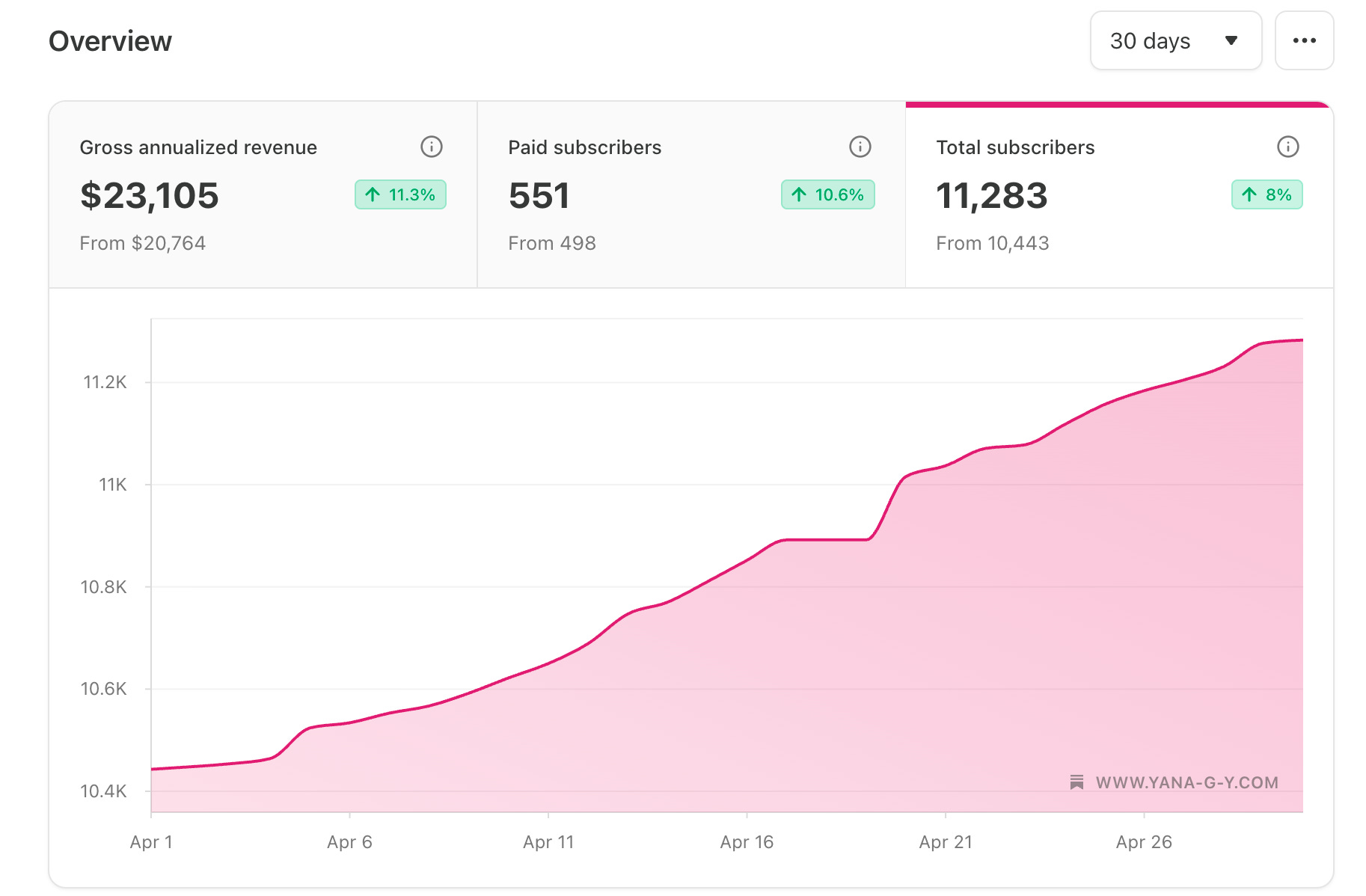
Just higher engagement and steady growth.
Consistent Notes, posted at the right times, in the formats my data says actually convert.
Same method from the Viral Notes Writer System.
And it works.
But lately, I’ve been testing something new on top of it.
I’ve been writing some of my Notes with Claude. And it worked too.
Don’t get me wrong, I’m not sunsetting the custom GPT, just extending it to Claude.
Why?
Because here’s what my tests proved: my custom GPT is crushing it on the short and punchy type of Notes. But Claude is better at storytelling and the conversational type.
So now I use both. And you can too.
Today I have a big announcement
Two, actually.
#1 → The Viral Notes Writer is now available as a Claude skill.
With all the training data from the GPT, and all its features, with the exact same behavior. Now installable inside Claude as a custom skill that works on any Claude paid plan (Pro, Max, Team, Enterprise).
Paid members get access to it (link below)
#2 → New collab product with Finn Tropy to schedule your Notes directly from Claude
You remember Finn. We launched the Substack Pro Studio GPT Bundle together back in August. He’s the engineer who builds tools for busy Substack creators, and we work well together because we approach this from the same angle: less hustle, more data.
This time, we built something that works entirely inside the Claude ecosystem.
It’s called the CreativeTech Substack Notes for Claude Bundle, and it pairs the Viral Notes Writer Claude skill with Finn’s Substack Notes for Claude Desktop - an MCP server that connects Claude directly to your Substack account so Claude can schedule, update, reschedule, and publish your notes for you.
Native scheduling. No copy-paste between Claude and Substack. No browser extension. No separate dashboard.
You write your notes inside Claude with my skill. Then you tell Claude when to post them at your preferred timing, and it does.
Paid members get a 50% discount code for the full bundle (link with promo code below, Finn’s courtesy)
What’s new in the Viral Notes Writer Update (April 2026)
I rebuilt the Viral Notes Writer for Claude from the ground up, using the same training data as the v4.0 GPT but adapting how it interacts with you. Here’s what’s new in both: the Claude skill and the Custom GPT.
#1 New category: Conversation Starters
This is the big one.
Substack has shifted in the past two months. The Notes going viral right now aren’t just punchy hooks. They’re Notes that spark conversations in the comments section. Notes that ask the right question, share the right vulnerable observation, or drop a contrarian take that pulls people into the comments.
I analysed my own Notes data with my Finn’s StackContacts database and the pattern was unmistakable: Notes that drive comments also drive subscribers. Not always the ones with the most likes. The ones with the most replies.
So I added Conversation Starters as a new category. The skill writes 5 Notes in this format every time you pick it. Each one is engineered around a comment-pulling structure: question hooks, vulnerable observations, contrarian micro-takes, and “tell me yours” closers.
If you’ve been getting good likes but few replies, this is the category to focus on for the next month.
#2 New “Mixed” option: 25 Notes from every type of Note in the Instructions
Sometimes you don’t want to choose. Sometimes you want a full week of Notes in completely different shapes so your feed doesn’t get repetitive.
The Mixed option does that. One pick, and the AI writes 25 Notes across all five categories: Viral, Subs Growth, Personal Story, Conversational Story, Conversation Starters, and the bonus templates from the training set.
It’s the fastest way to get a full content batch ready for the week.
Heads up: Mixed produces a longer output, so give Claude a minute to finish writing.
#3 New workflow: it asks first, then lists every category
The old workflow assumed you knew what you wanted.
The new one walks you through it.
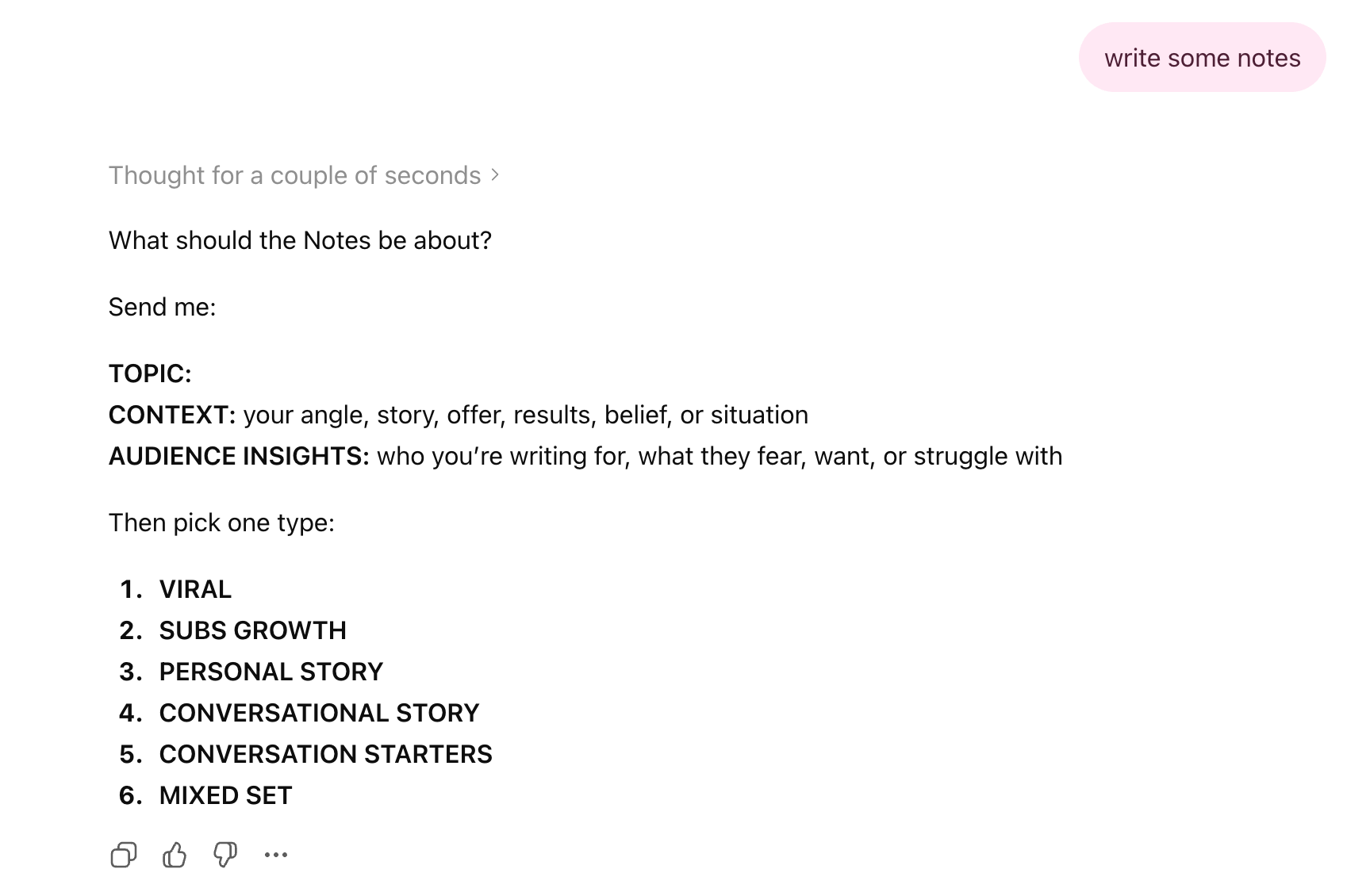
You ask Claude to write some Notes using the Viral Notes Writer skill. Claude asks you for three things: your topic, your context, your audience insights. You answer. Then it shows you five buttons, one for each category, and tells you what each one does. You click. It writes.
Or, if Claude already knows you from past chats, you can just say “use what you know” and skip the questions entirely.
I implemented the same workflow in the custom GPT as well and it looks like this:
How I prompt the skill
There are two prompts I use depending on the situation.
When I want fresh Notes from scratch:
“Using the Viral Notes Writer skill, write some Notes for me. Use what you already know about my newsletter and audience from our past conversations.”
This works because Claude remembers context across chats if memory is enabled. It pulls from everything I’ve already told it about Unplugged, my audience, my recent posts. I don’t have to re-explain who I am every time.
When I have a specific topic or angle:
“Using the Viral Notes Writer skill, write some Notes about [specific topic]. My latest post was about [topic]. I want to drive replies, so use the Conversation Starters category.”
Whatever you put in your prompt is what Claude has to work with. Vague input, vague Notes. Specific input with real numbers and real audience details, sharp Notes. This is true of every AI tool, but it’s especially true here because the skill is designed to work with specifics.
The Substack Notes for Claude Desktop bundle
Now this one is powerful. Here’s what you get in the bundle:
→ The Viral Notes Writer Claude skill (the one I just announced)
→ Substack Notes for Claude Desktop, Finn’s MCP extension that connects Claude directly to your Substack account
The MCP extension is the engine. It lets Claude do things, not just suggest them. Once it’s installed, you can:
Ask Claude to draft Notes from your conversation context
Tell Claude to schedule them on specific dates and times (Substack stores them server-side, your computer doesn’t have to stay on)
Reschedule, cancel, or edit drafts without leaving the chat
Publish immediately when you want a Note to go live now
The whole point is that you stop bouncing between tools. You write, schedule, and manage your full Notes calendar inside one Claude chat.
The bundle is normally $79. Paid Unplugged members get 50% off with the discount code below.
Kay already tried it, here’s what she said:

Which tool to use and when
I get this question a lot, so here’s my honest framework.
Use the GPT when:
You want fast and punchy Notes (under 1 minute per batch)
You want short, hook-driven, scannable Notes
You don’t have a paid Claude plan yet
Use the Claude skill when:
You want longer, conversational, story-driven Notes
You’re working from your laptop and have more time
You also want to schedule the Notes inside Claude with the bundle
Use both when:
You want a varied feed across the week
You want to test which format converts better for your audience
You write across different topics and want different shapes
There’s no rule. I switch between them depending on what I’m writing about and how much time I have. Both are trained on the same proven data, so the underlying logic is identical. The output just sounds different.
How to get it?
Here’s the link to the bundle product with detailed instructions how to install it - takes 2 minutes:
As a paid member, you get 50% OFF discount code, Finn’s courtesy - find it below as well as the link to the Claude skill